
On my quest to becoming a stronger Python developer I set myself the task of creating a tool that I could use to scrape craigslist and send out e-mail alerts when search results changed. My intention being to use this to find Burning Man tickets for friends who still needed them (I found mine on craigslist last year). It’s my conjecture that you will find honest folk selling tickets on craigslist at face value, you just have to be the first to reply to the post, hence the goal. I remained unperturbed from this quest after a good friend pointed out that the website https://ifttt.com already does a great job of providing this service, mostly because I knew I would learn a lot from doing this, but also because I figured I could create a tool with different functionality.
- This post demonstates how to use Python to search craigslist and e-mail the results (via a gmail account)
- My next post will show how to get this running on an Amazon web server so that you can set yourself up with an alert system when search results change (As mentioned, similar to https://ifttt.com)
automated_craigslist_search
I created the repository automated_craigslist_search on github available for download here.
Here’s the README.md. This will show what you how to install the module and some examples of using it:
Installation
Clone and install the module by doing the following:
$ git clone git@github.com:robertdavidwest/api-automated_craigslist_search.git #assuming ssh install
$ cd automated_craigslist_search
$ python setup.py install
Test the install
$ python
Enthought Canopy Python 2.7.3 | 64-bit | (default, Dec  2 2013, 16:09:43) [MSC v
.1500 64 bit (AMD64)] on win32
Type "help", "copyright", "credits" or "license" for more information.
>>> import automated_craigslist_search
Dependencies
beautifulsoup4(web scrapin’ n that)pandas(for all things data)
You can install both of these using pip:
$ pip install pandas
$ pip install beautifulsoup4
Some Examples
Example 1 – a simple search
Using the function search_craigslist, we can mimic the craigslist search functionality and the resulting search results are stored in a pandas.DataFrame. For a full description of the function see the doc string.
The following search:
>>> from automated_craigslist_search import connect_to_craigslist
>>> search_key_words = "parrot cage"
>>> df = connect_to_craigslist.search_craigslist(search_key_words,min_value=50, max_value=250,words_not_included="dead",city="newyork")
Will return:
>>> df.head()
     Date               Location Price Results                                              urls
0  Jun 30   (Allentown PA 18102)   $50 Large Vintage Pedestal Birdcage/ Parrot Cage -...    /mnh/fud/4543304897.html
1  Jun 29           (Pelham, NY)  $250 King's Large Parrot Cage - Like New!                 /wch/for/4545509813.html
2  Jul  1         (brentwood ny)   $50 Large parrot Cage for sale Must go TODAY             /lgi/hsh/4547799198.html
3  Jul  1         (brentwood ny)   $50 Large parrot Cage for sale Must go TODAY -           /lgi/for/4547724127.html
4  Jun 29      (South River, NJ)   $90 New Large Parrot Cage Bird Cages On Sale! 10 M...    /jsy/fod/4507112277.html
Example 2 – search and send results
Using the function search_and_send you can e-mail (from a gmail account, this could be adapted to include others) out a html formatted display of the search results from a craigslist search to mailing list. Then from your OS you can run this function periodically using application like Cron for example.
>>> from automated_craigslist_search import connect_to_craigslist
>>> mailing_list = ["pet_stores_in_ipswitch@yahoo.com", "dazed_parrots_in_bolton@gmail.com"]
>>> my_gmail = <yourgmailusername>@gmail.com
>>> password = <yourgmailpassword>
>>> search_key_words = "parrot cage"
>>> connect_to_craigslist.search_and_send(my_gmail, mailing_list, password, search_key_words,min_value=50, max_value=250,words_not_included="dead",city="newyork")
NOTE: If you have 2 step verification turned on, on your gmail account you will need to disable, or, set up a separate gmail account (I prefer the latter, you can then also set up a handle related to the task at hand)
Collecting interesting data from craigslist posts
For a class I’m taking I needed to aggregate some data collected from the web either via an API or scraping. I decided to use automated_craigslist_search. I wanted to look at something more interesting than Ikea furniture sales but less offensive than “men seeking women”, so I went with the “Activity Partners” section. Here’s what I did:
I ran a search for activity partners across 7 different cities in the US and then found the most commonly observed words in each post, with a limit of 1 count per post (filtering for common non related words and some idiosyncratic words that appear in posts like “wanted”, “need” and “help”. Heres the results:
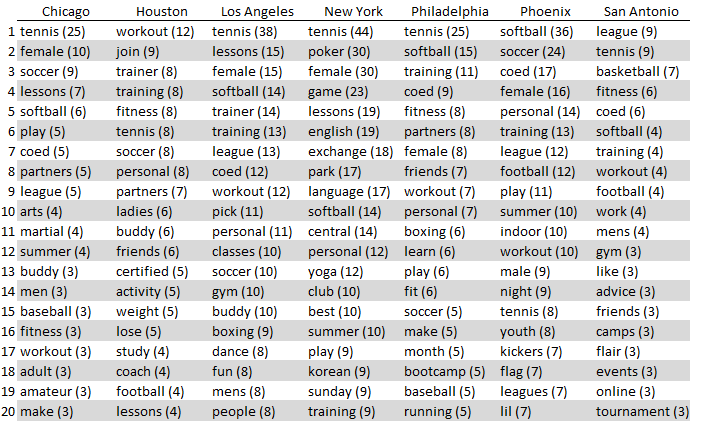
and a few observations:
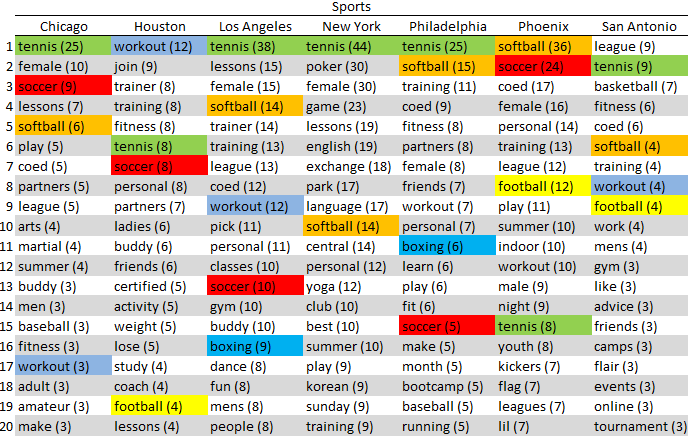
- There were quite a few different sports returned in the results as one expect, especially at this time of year, which might also account for the popularity of Tennis across all cities. Basketball was surprisingly only seen in San Antonio
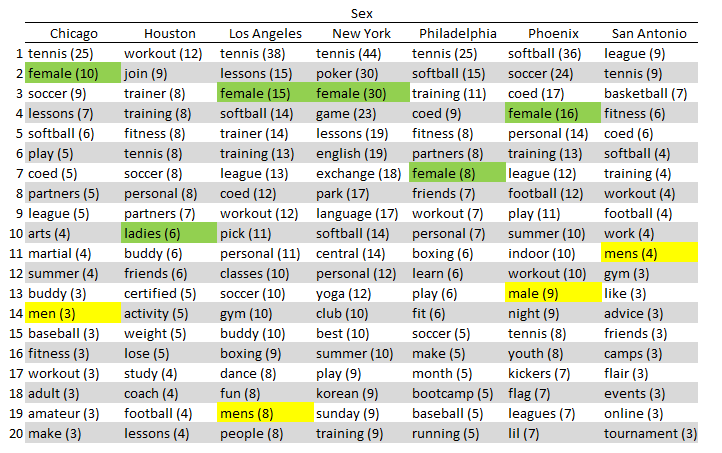
- It looks like women are more in demand then men (somehow doesn’t seem surprising)
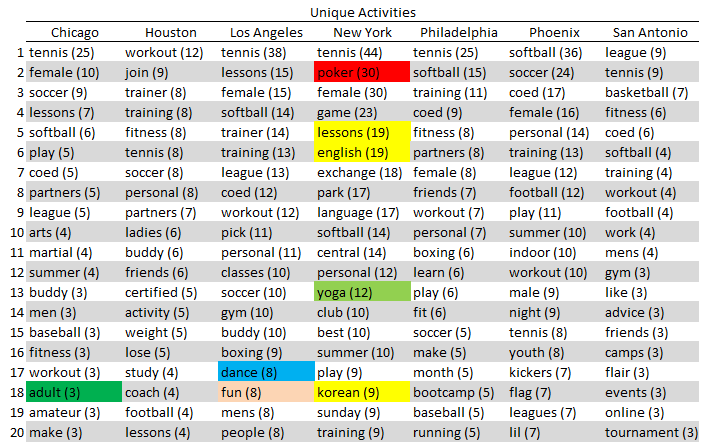
- Of all the cities I looked at, New York had by far the most unique activities, i.e. that were not found in the top 20 of the other cities
If you want to try running this yourself and are feeling daring enough to apply it to the “men seeking women” or whatever else, here is the code I used to run it. After obtaining the data from craigslist using the module above It mostly involves cleaning and standardizing the results in a way that makes it possible to find the top 20 words (e.g. making everything lower case, removing digits etc):
import pdb
import automated_craigslist_search.connect_to_craigslist as connect_to_craigslist
import pandas
import string
from nltk.corpus import stopwords

def is_number(s):
    '''Returns True is the string 's' contains a number, false otherwise.'''
    try:
        float(s)
        return True
    except ValueError:
        return False

def top_words(df):
    ''' Takes as an argument a pandas dataFrame containing craigslist search resuults from connect_to_craigslist.search_craigslist(). Returns a list of the most popular words in the search results (with a limited count of one entry per search result and excludes certain words such as the stopwirds provides by the module 'nltk' and various other keywords. Returns a pandas.DataFrame of results ordered by frequency

    :param df: a pandas DataFrame containing craigslist search resuults from connect_to_craigslist.search_craigslist()
    :type seach_key_words: pandas.DataFrame

    :param html: a pandas DataFrame containing a list of the most frequently seen words in search results
    :type seach_key_words: pandas.DataFrame

    '''
    # Remove duplicate listings
    all_words = df.Results.unique()

    # make all entries lower case
    all_words = [x.lower() for x in all_words]

    # remove punctuation
    exclude = set(string.punctuation)
    without_punc = []
    for s in all_words:
        without_punc.append(''.join(ch for ch in s if ch not in exclude))
    all_words = without_punc

    # remove numbers
    without_numbers = []
    for s in all_words:
        without_numbers.append(''.join(ch for ch in s if not is_number(ch)))
    all_words = without_numbers

    # split the string on each row into single words
    split_words = [x.split() for x in all_words]


    # concatenate all words
    full_list = []
    for x in split_words:
        full_list = full_list + x

    # Remove standard words using NLTK library
    std_word_set=set(stopwords.words('english'))
    full_list = [x if x not in std_word_set else None for x in full_list]

    # remove non activity entries
    location_words = ['manhattan','midtown',"nyc","houston","san","antonio",
    "pheonix","city","chicago","phoenix"]
    needy_words = ["looking","seeking","want","wanted","needed","need","help"]
    others = ['sick','action',"new",'opening',"starts","players","player","free",
    "partner","team","group","july","get","th"]
    non_actitivity_words = location_words + needy_words + others
    full_list = [x if x not in non_actitivity_words else None for x in full_list]

    # find the list of unique words
    unique_list = []
    for x in full_list:
        if x not in unique_list:
            unique_list.append(x)

    # count the occurence of each word, 1 per row of the dataset
    count_entries = []
    for y in unique_list :
        count = 0
        for x in split_words:
            if y in x:
                count = count + 1

        count_entries.append(count)

    # stores the unique entry results in a dataframe
    unique_words_df = pandas.DataFrame({"Unique Words" : unique_list, "frequency" : count_entries})

    # drop null values
    unique_words_df = unique_words_df[~unique_words_df['Unique Words'].isnull()]

    # sort dataframe
    unique_words_df = unique_words_df.sort('frequency',ascending=False)

    return unique_words_df


if __name__ == "__main__":

    # top 10 us cities by population
    cities = ['newyork'] #,'losangeles','chicago','houston','philadelphia','phoenix','sanantonio'] #,'sandiego','dallas','sanjose']

    ################################################
    # Activity Partners top 20 across mutiple cities
    all_data = pandas.DataFrame()
    for current_city in cities:
        pdb.set_trace()
        df = connect_to_craigslist.search_craigslist('',category='activity partners', city=current_city)
        # top 20 from each city
        topwords_df = top_words(df)
        topwords_df['city'] = current_city
        top20 = topwords_df[:20]
        top20['idx'] = range(20)
        all_data = all_data.append(top20)

    # reshape data
    df_pivot = all_data.pivot(index='idx', columns='city')
    # export
    df_pivot.to_csv('activities.csv')
 Robert David West